Strichmaennchen3D

Browser-based 3D stick figure pose editor.
Zero setup—open in browser and start posing.

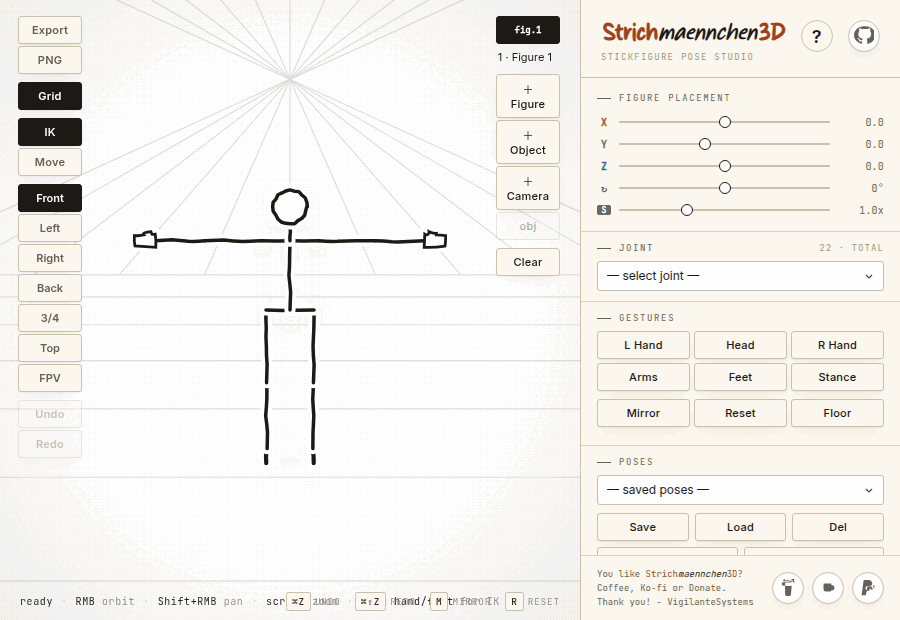
Dragging a poseable figure's limb — IK solves the chain

Hand-drawn figure — drag a limb, IK solves the chain. No install.

Hand-drawn render styles, IK-limb posing, multi-figure scenes, and animation keyframes.

Support the project

Features

5 Render Styles

Drawn, Line, Brush, Blueprint, and Pictogram styles for every artistic need.

Inverse Kinematics

Drag hands and feet to automatically solve arm/leg chains. Aim IK for smooth limb sweeps.

Multi-Figure Scenes

Create and manage multiple figures with independent poses, positions, and scales.

Scene Management

Save/load complete workspaces, export PNG/SVG, and create animation sequences.

12 Head Styles

Customize figures with plain, spikes, horns, ninja, crown, and more.

Intuitive Controls

Right-click orbit, shift+pan, keyboard shortcuts (⌘Z, M, R, 1-7), and 3-axis sliders for every joint.

Animation Keyframes

Build multi-figure animation sequences with keyframes. Play back in-app or export as PNG sequence for Blender / After Effects / Unity.

12 Head Styles

Plain, spikes, horns, ninja, crown, headphones, and more — give each character instant personality without drawing.

9 Camera Presets

Front, back, left, right, 3/4, top, side plus first-person view (FPV). One-click clean reference angles every time.

Documentation

Start Here

Quick access to get you creating your first pose in 30 seconds

30 Seconds to First Pose

  1. Open app.html in browser
  2. Click "+ Figure" in viewport panel
  3. Drag a hand or foot — IK solves the arm/leg chain
  4. Click "Export" → PNG/SVG for your reference

Artist & Developer Workflows

  • Concept Artist: Add figure, switch to "Brush" style, cycle head styles (H key), export SVG for Illustrator/Figma
  • Animator: Create multiple figures, pose for key moments, add keyframes in Sequence panel, export PNG sequence
  • Game Dev: Add multiple figures for characters, use IK for natural movement, export SVG sequence for Unity/Unreal/GODOT

Common Tasks

  • Create Symmetrical Pose: Pose left arm/leg, click "Mirror" button, right side auto-copies
  • Make Feet Touch Ground: Click "Floor Snap" button to enable ground constraint
  • Add Another Figure: Click "+ Figure" button to add additional characters

Troubleshooting

  • Feet sinking? → Click "Floor Snap"
  • Can't click joint? → Unfreeze figure or close floating panel
  • Export is black? → Refresh page and try again

Reference

Detailed information on controls, styles, and composition

Camera Controls

ActionInput
Orbit viewportRight-click + drag
Pan viewportShift + Right-click + drag
Zoom in/outScroll wheel
Reset cameraClick "Reset" button
Preset viewsFront, Back, Left, Right, 3/4, Top buttons

Pose Controls

ActionInput
Select jointClick on figure or dropdown
Rotate jointX/Y/Z sliders in Floating Dials
Undo⌘Z (Mac) / Ctrl+Z (Windows)
Redo⌘⇧Z (Mac) / Ctrl+Shift+Z (Windows)
Mirror poseM
Reset to T-poseR

Viewport Actions

ActionInput
Toggle gridClick "Grid" button
Toggle IK modeClick "IK" button
Toggle move modeClick "Move" button
Drag with IKHold mouse, drag hand/foot to target
Drag without IKClick + drag joint directly (rotate)

Head Styles

  • Plain
  • Spikes
  • Tuft
  • Band
  • Bun
  • Horns
  • Ninja (masked)
  • Balaclava (masked)
  • Headphones
  • Crown
  • Cap
  • Ribbon

Render Styles

  1. Drawn (wobbly pencil)
  2. Line (clean ink)
  3. Brush (calligraphy)
  4. Blueprint (technical)
  5. Pictogram (geometric icon)

Multi-Figure Composition

  1. Click + Figure to add a new character
  2. Click the figure in the list to select it (active figure is highlighted)
  3. Use "Figure placement" sliders to position (X/Y/Z) and rotate (↻)
  4. Adjust scale with the Scale slider (0.1x to 3.0x)

Action Objects

  1. Click + Action to add effect objects (boom, dust, lines, arrow, circles)
  2. Click the action object in the figures list to select it
  3. Position and rotate in 3D space using placement sliders

Export Options

  • PNG: Transparent background, web-ready
  • SVG: Scalable vector for editing
  • PNG Sequence: Create animations with keyframes

Interface Layout

Sidebar (Left): Joint selection, transforms, figure management, poses/scenes, render style, export format

Viewport (Right): Canvas + SVG overlay with stick figures

View Stack (Top-right): Export, Grid, IK, Move toggles + camera presets

Floating Dials: Draggable joint rotation panel with X/Y/Z sliders

Deep Dive

Technical details and architecture

Architecture

Core Architecture

ComponentTechnology
3D EngineThree.js 0.160.0 (invisible skeleton)
RenderingSVG-based custom pipeline
LanguageVanilla JavaScript (ES6)
Build SystemPython build script (HTML injection)
DependenciesNone (zero frameworks)

Rendering Pipeline

  1. Three.js Skeleton: Invisible 3D hierarchy for math (IK, raycasting)
  2. SVG Overlay: Custom hand-drawn rendering
  3. Depth Sorting: Dynamic layering with paper halos
  4. Wobble Effect: Seeded pseudo-random jitter for hand-drawn aesthetic

Data Storage

KeyPurpose
strich_posesIndividual poses (localStorage)
strich_scenesComplete multi-figure scenes (localStorage)

Performance Optimizations

  • Memory pools for Three.js objects (Vector3, Quaternion, Matrix4)
  • Dirty flag pattern (SVG only re-renders when changed)
  • DOM pooling (SVG elements reused, not recreated)
  • Single raycaster per frame for joint selection

Project Structure

src/          — Source files (HTML, CSS, JS)
html/         — Built output (index.html)
docs/         — End-user documentation
dev_docs/     — Developer notes and plans
scripts/      — Build automation
website/      — Info website (this)

Performance Notes

Frame Rate Targets

StatePerformance
Target FPS60 FPS (16.67ms per frame)
Idle state~2-4ms per frame (only RAF, no render)
Active manipulation~20-50ms per frame
Complex scenesMay exceed 60ms (browser throttles gracefully)

Known Limitations

  • Touch/mobile support is highly limited (desktop mouse/keyboard workflow)
  • No physics simulation (manual foot placement required)
  • Very complex scenes (15+ figures with 10+ action objects) may experience frame drops
  • SVG rendering cost scales with scene complexity (hundreds of elements at max complexity)

Technical Specs

Joints & Kinematics

  • 19 articulated joints per figure
  • Independent X/Y/Z rotation control per joint
  • Inverse Kinematics (IK) for limb solving
  • Aim IK for smooth joint sweeps

Head Styles

12 dynamic head styles:

  1. Plain
  2. Spikes
  3. Tuft
  4. Band
  5. Bun
  6. Horns
  7. Ninja (masked)
  8. Balaclava (masked)
  9. Headphones
  10. Crown
  11. Cap
  12. Ribbon

Render Styles

  1. Drawn (wobbly pencil)
  2. Line (clean ink)
  3. Brush (calligraphy)
  4. Blueprint (technical)
  5. Pictogram (geometric icon)

Camera Presets

6 orthographic-style views: Front, Back, Left, Right, 3/4, Top

Export Formats

  • PNG (transparent background)
  • SVG (scalable vector)
  • PNG sequence (animation frames)